Game Console Hardware: Evolution of Components and Architecture
The architecture of game consoles has evolved from simple, dedicated circuit boards to sophisticated machines that mirror the power of personal computers. In the early days, consoles were built using customized printed circuit boards (PCBs) and integrated circuit chips. Because persistent memory was prohibitively expensive, early titles like Pong relied on processor registers to store game states, limiting the complexity of the gameplay.
By the 1980s and 1990s, the industry entered the "bit wars," where manufacturers marketed the word size of their processors as a primary selling point. Today, consoles are highly integrated systems that balance high-performance gaming with cost-effective consumer pricing. Unlike personal computers, which are designed for modularity, console hardware is preselected and customized to ensure consistent performance for developers.
Key Facts
- System on a Chip (SoC): Modern consoles often combine the CPU and GPU into a single chip to reduce size and cost.
- GPU Performance: Modern graphics power is often measured in TFLOPS (teraflops), though actual performance depends on memory bandwidth and architecture.
- Storage Evolution: Media has shifted from ROM cartridges to optical discs (CD, DVD, Blu-ray) and now toward digital distribution and high-speed SSDs.
- Hardware Optimization: Consoles use fixed hardware sets to allow manufacturers to optimize motherboard size and efficiency.
Core Internal Components
Processing Units
The Central Processing Unit (CPU) is the brain of the console, handling the primary computational workload. Its performance is generally defined by its word size (e.g., 8-bit or 64-bit) and clock speed (measured in hertz). To maintain platform exclusivity, manufacturers historically used unique instruction set architectures—the low-level machine code the CPU understands—making it difficult to port games between systems. Most modern consoles have since shifted toward the x86 architecture to ease development across PC and console platforms.
The Graphical Processing Unit (GPU) handles the rendering of data for video output. Early GPUs focused on simple bitmapped graphics and sprites using integer mathematics. The shift to real-time 3D polygonal rendering in the 1990s required GPUs capable of floating-point calculations. Modern GPUs from vendors like AMD and NVIDIA are highly parallel devices, utilizing multiple compute units to process data simultaneously.
Memory and Storage
Random-access memory (RAM) provides high-speed read/write capabilities for active game data. Beyond capacity, bandwidth (the speed of data transfer in bytes per second) is critical for feeding the CPU and GPU without bottlenecks.
Internal storage has evolved from simple flash memory to Hard Disk Drives (HDD) and now Solid-State Drives (SSD). In current-generation systems like the PlayStation 5 and Xbox Series X, high-speed SSDs are used not just for storage, but to augment RAM through high I/O speeds and hardware decompression.
Supporting Circuitry
- Motherboard: The primary PCB where main chips are mounted.
- Daughterboard: A secondary PCB for additional or easily replaceable functions.
- BIOS (Basic Input/Output System): Firmware that directs the console's initial operations upon power-up.
- Southbridge: A unit that manages slower I/O components, such as controllers and internal storage.
- Coprocessors: Dedicated chips for specific tasks, such as audio processing.
Power, Cooling, and Interface
Consoles require a power supply to convert AC wall power to DC electronics power, often via an internal unit or an external "power brick." To prevent overheating from high-performance CPUs and GPUs, integrated cooling systems are essential. The entire assembly is housed in a protective case that also manages airflow.
User interaction is handled via controllers, which have evolved from simple paddles and joysticks to complex gamepads. These may be wired or wireless, with the latter requiring batteries or rechargeable packs.
Game Media and Distribution
The method of delivering software has undergone several major shifts:
- ROM Cartridges: Introduced by the Fairchild Channel F, these PCBs housed read-only memory. Some later versions included enhancement chips, like Nintendo's SuperFX.
- Optical Media: CD-ROMs, DVDs, and Blu-rays became dominant starting in the fifth generation due to lower production costs and higher storage for full-motion video.
- Digital Distribution: Integrated internet connectivity allows users to purchase and download games directly from digital storefronts.
- Cloud Gaming: The most recent shift, moving processing and storage to remote servers.
While magnetic storage (tape drives, floppy disks) was common for PCs, it saw limited use in consoles due to fragility, with few exceptions like the Nintendo 64DD.
| Media Type | Primary Era | Key Advantage | Key Limitation |
|---|---|---|---|
| ROM Cartridge | Early - Mid Generations | Fast load times, durability | Higher production cost, lower capacity |
| Optical Disc | 5th - 8th Generations | Massive storage, cheap production | Slower read speeds, fragile surface |
| Digital/SSD | 7th Generation - Present | Instant access, no physical waste | Requires internet and internal storage |
External Storage and Services
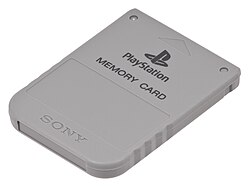
To expand capacity, consoles support external storage. This began with flash-based memory cards (popularized by the PlayStation) and evolved into USB external hard drives and SD cards.
Modern consoles also integrate online services (e.g., Xbox network, PlayStation Network, Nintendo Switch Online). These range from free identity services to paid subscriptions that offer cloud saves, social networking, and online multiplayer.
Accessories and Add-ons
Manufacturers have historically released add-ons to extend console life, such as the Sega CD or the Game Boy Player for GameCube. Modern accessories focus on immersive experiences, including:
- Video Cameras: Used for motion sensing and augmented reality (e.g., Kinect, EyeToy).
- VR Headsets: Providing virtual reality experiences, such as the PlayStation VR.
- Docking Stations: Used primarily for handheld-hybrid consoles.
Frequently Asked Questions
What is a System on a Chip (SoC)?
An SoC is an integrated circuit that combines multiple components, such as the CPU and GPU, onto a single chip to reduce the overall size, cost, and power consumption of the console.
How does TFLOPS measure GPU performance?
TFLOPS (teraflops) measures the number of floating-point operations a GPU can perform per second. While it provides a rough estimate of raw power, actual performance is also influenced by memory bandwidth and system architecture.
What is the difference between the Northbridge and Southbridge?
The Northbridge typically handles high-speed communication between the CPU and RAM/GPU, while the Southbridge manages slower I/O functions, such as USB ports and internal storage.
Why did consoles move from cartridges to optical discs?
Optical discs were significantly cheaper to produce and offered vastly more storage space, which allowed developers to include higher-quality audio and full-motion video (FMV) that cartridges could not support.
What role does the BIOS play in a modern console?
In modern consoles, the BIOS serves as the fundamental instruction set that directs the system to load the full operating system from internal memory when the device is powered on.