Wubi: The Windows-Based Ubuntu Installer History
For many users, the prospect of switching to Linux can be daunting, primarily due to the risks associated with disk formatting and partitioning. Wubi was developed to solve this problem, providing a safe bridge for Windows users to experience Ubuntu without the fear of data loss.
Unlike a traditional installation that requires a dedicated hard drive partition, Wubi functions as a specialized installer that allows Ubuntu to reside directly within the Windows file system. This approach removed the technical barriers that often discouraged beginners from trying a new operating system.
Key Facts
- Purpose: Enabled Windows users to try Ubuntu without risking data loss from partitioning mistakes.
- Mechanism: Uses a loopmounted device (a disk image file) rather than a separate partition.
- Integration: Adds a boot option directly to the Windows boot menu.
- Uninstallation: Allows users to safely remove Ubuntu from within the Windows environment.
- Status: Officially removed from Ubuntu downloads starting with version 13.04.
How Wubi Works
Wubi is not a virtual machine or a standalone Linux distribution; it is an installer for Ubuntu. It creates a stand-alone installation within a loopmounted device—essentially a disk image file that the Linux system perceives as a real hard disk.
Specifically, Ubuntu is installed into a file located at c:\ubuntu\disks\root.disk. To handle memory management, Wubi also creates a swap file at c:\ubuntu\disks\swap.disk, which Ubuntu treats as a standard swap partition in addition to the host machine's physical memory.
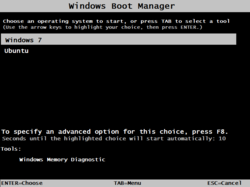
Once installed, Wubi modifies the Windows boot menu, allowing users to choose between Windows and Ubuntu upon starting their computer.
Transitioning to Real Partitions
While Wubi avoids the need for initial partitioning, users who decided to commit to Ubuntu could use the Loopmounted Virtual Partition Manager (LVPM). This tool allows the transfer of a Wubi-generated installation to a dedicated real partition or a bootable USB keydrive. This workflow allowed users to test the OS and verify driver compatibility before making permanent changes to their disk structure.
Evolution and Timeline
Wubi began as an independent project, with versions 7.04 and 7.10 serving as unofficial releases. Its utility was recognized by the Ubuntu team, and the code was officially merged into Ubuntu for version 8.04, appearing on the Ubuntu Live CD starting with alpha 5.
A sister project called Lubi attempted to reverse this logic by using Linux as the host system to install Windows. However, Lubi ceased development in 2007 and only supports Ubuntu 7.04.
As the Ubuntu ecosystem evolved, Wubi was eventually phased out. It was removed from the official download page starting with Ubuntu 13.04, though installers remained available for versions up to 14.10.
| Version/Date | Milestone |
|---|---|
| 7.04 & 7.10 | Unofficial independent releases |
| 8.04 | Merged into official Ubuntu code; added to Live CD (alpha 5) |
| 13.04 | Removed from official download page |
| 14.10 | Final official version supported by installers |
| 2022-04-03 | wubiuefi fork supports Ubuntu 20.04.4 |
Modern Alternatives: wubiuefi
Although official support has ended, the community has maintained the spirit of the project through wubiuefi. This unofficial fork extends compatibility to modern systems by supporting both UEFI and legacy BIOS, enabling the Wubi installation method for newer Ubuntu versions, including 20.04.4.
Frequently Asked Questions
Is Wubi a virtual machine?
No, Wubi is not a virtual machine. It creates a stand-alone installation using a loopmounted disk image file within the Windows file system.
Can I move a Wubi installation to a real partition?
Yes, this can be achieved using the Loopmounted Virtual Partition Manager (LVPM), which can transfer the installation to a dedicated partition or a bootable USB drive.
How does Wubi handle system memory?
In addition to the host machine's RAM, Wubi creates a specific swap file (swap.disk) within the Windows file system that Ubuntu recognizes as a swap partition.
Is Wubi still officially supported by Ubuntu?
No, Wubi was removed from the official Ubuntu download page starting with version 13.04, and official installers only went up to version 14.10.
What is wubiuefi?
wubiuefi is an unofficial fork of the original Wubi project that adds support for UEFI and legacy BIOS, allowing newer versions of Ubuntu (such as 20.04.4) to be installed via the Wubi method.