News Aggregators: How Feed Readers Streamline Digital Content
In an era of information overload, staying updated with online newspapers, blogs, and podcasts can feel like a full-time job. This is where a news aggregator—also known as a feed reader, content aggregator, or simply an aggregator—becomes essential. These tools act as a centralized hub, gathering digital content from various sources into a single location for easy viewing.
By consolidating updates such as journal tables of contents, videos, and news items, aggregators create a personalized information space. Instead of visiting dozens of individual websites, users can simply check one application to see everything new since their last visit.
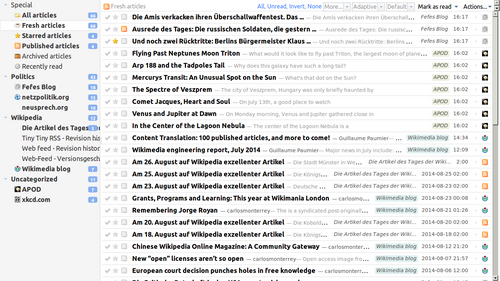
Key Facts
- Function: Aggregators pull content to the subscriber at user-determined intervals.
- Formats: Most feeds use XML (Extensible Markup Language) via RSS or Atom formats.
- Types: Available as web-based applications or desktop software.
- Capabilities: Some can automatically download media files like MP3s for podcasts.
- History: RSS was introduced by Netscape in 1999 and gained massive traction in the early 2000s.
How Aggregation Technology Works
Aggregation technology works by "pulling" information to the subscriber. Unlike "push" notifications—such as emails or instant messages—an aggregator allows the user to control the flow of information. Once you subscribe to a feed, the software checks for updates at specific intervals and retrieves new content automatically.
The data is typically structured using XML, a language used to format data so it can be easily read by machines. Common formats include RSS (Really Simple Syndication) and Atom. These structured pieces of information are then displayed in a user-friendly interface, making complex data easy to browse.

Desktop vs. Web-Based Readers
Users generally choose between two types of software:
- Desktop Applications: These offer richer user interfaces and can often provide access to previously loaded content even when the computer is offline.
- Web-Based Readers: These offer the convenience of accessing up-to-date feeds from any device with an internet connection.
The Evolution of Web Feeds
The history of web syndication began in 1999 with Netscape. While the initial RDF-based data models were considered too complex for average users, the technology found its footing in the early 2000s. A major turning point occurred when the New York Times implemented RSS, helping to establish it as a de facto industry standard.
By 2005, major browsers like Microsoft Internet Explorer, Mozilla Firefox, and Apple Safari began integrating feed technology directly into their products. The impact was significant; by 2015, over 20 million websites were using RSS.
Diverse Types of Aggregators
Not all aggregators function the same way. They can be categorized based on how they collect and present information:
Automated News Services
Services like Google News, Yahoo News, and Bing News use automated algorithms to perform contextual analysis, grouping similar stories together automatically. In contrast, sites like Drudge Report or HuffPost supplement automated feeds with human-curated content.
Social and Specialized Aggregators
Social news aggregators rely on community engagement. Users submit "stories," comment, and rate them, creating a real-time compilation of what is currently popular. Other specialized tools include:
- Podcatchers: Aggregators specifically designed to manage audio and video media enclosures.
- Broadcatching: Mechanisms that automatically download BitTorrent files advertised through RSS feeds.
- Planet Sites: Web applications used by online communities to aggregate multiple blogs into one centralized location.
Managing Information Overload
A common challenge with aggregators is the sheer volume of content. To combat this, many readers offer feed filtering. Users can tag feeds with keywords to sort articles into navigable categories or use an "Attention Profile" to filter items based on personal relevance.
Advanced research is even looking into media bias-aware aggregators. These systems use text features to identify how different outlets report on the same event, helping users recognize differences in framing and perspective.
Summary of Aggregator Comparison
| Type | Primary Method | Key Benefit |
|---|---|---|
| Web-Based | Remote Servers | Access from any internet-connected device |
| Desktop App | Local Installation | Richer UI and offline access |
| Social Aggregator | Community Voting | Real-time trending content |
| Automated News | Algorithms | Contextual grouping of similar stories |
Frequently Asked Questions
What is the difference between "push" and "pull" information?
Push information, like email, is sent directly to you by a source. Pull information, used by aggregators, involves the software checking a source at intervals to retrieve new content only when requested or scheduled.
How do I subscribe to a new feed?
While some applications automate the process, the most common way to subscribe is by clicking on a web feed icon or a specific text link provided on a website.
Can aggregators handle more than just text?
Yes. Many aggregators can handle multimedia, including podcasts (audio) and vlogs (video). Some can even automatically download these files to your computer or portable media player.
Is RSS still relevant today?
Yes. Despite the shutdown of services like Google Reader, RSS remains a vital delivery mechanism for businesses to reach users and for individuals to efficiently filter and consume digital content.
What are the main formats used for feeds?
The most common formats are RSS and Atom, both of which utilize XML to structure information for the reader.