.NET Gadgeteer: Design and Construction Fundamentals
.NET Gadgeteer provides a streamlined approach to hardware prototyping by combining a flexible physical architecture with powerful software integration. By utilizing a modular system, developers can rapidly assemble complex electronic projects without the need for intricate wiring or deep hardware engineering knowledge.
Hardware Architecture and Connectivity
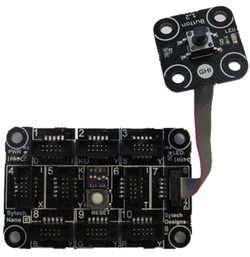
At the core of every project is the mainboard, which serves as the central hub for all operations. This board features several sockets designed to accept various modules—specialized hardware components that provide specific functionalities. These modules are linked to the mainboard via a standard 10-pin connector.
To ensure compatibility, the system uses a simple lettering scheme. Each socket on the mainboard is marked with a series of letters indicating the types of modules it can support, and every module is labeled with a corresponding letter to identify its type. While connecting modules incorrectly generally does not harm the hardware, users must be cautious with power sources.
Power modules, which provide energy via USB, DC, or battery, are distinctively colored red. This visual cue is critical because using more than one red power module simultaneously can potentially damage the devices.
Software Integration and the Gadgeteer SDK
The transition from physical assembly to functional programming is handled by the Gadgeteer library. This library employs a layer of event-driven drivers (software that manages hardware interactions based on specific triggers) and automated code generation that integrates directly with Visual Studio.
Developers can use a visual diagramming tool within Visual Studio to map out exactly which modules—such as a camera, button, or screen—are plugged into which mainboard sockets. Once the diagram is complete, the Gadgeteer SDK automatically generates the necessary code to create object instances for that specific hardware configuration. This allows the developer to bypass tedious setup and immediately begin writing .NET code to control their device.
The Gadgeteer Ecosystem
The versatility of the platform is expanded by a wide array of modules produced by various hardware vendors. This ecosystem includes components for wireless transmission, environment sensors, and actuators, as well as custom modules developed by the community, enabling a vast range of project possibilities.
| Component | Function | Key Feature |
|---|---|---|
| Mainboard | Central Controller | Letter-coded sockets |
| Modules | Hardware Functionality | 10-pin standard connector |
| Power Modules | Energy Supply | Red color coding for safety |
| Gadgeteer SDK | Software Bridge | Visual-to-code generation |
Key Facts
- Modular Design: Uses a mainboard and modules connected by 10-pin connectors.
- Compatibility: Sockets and modules are identified by letters to ensure correct pairing.
- Power Safety: Only one red power module should be used to prevent hardware damage.
- Visual Programming: Visual Studio integration allows for visual hardware mapping.
- Automation: The SDK auto-generates object instances based on the hardware diagram.
- Diverse Ecosystem: Supports wireless, sensing, and actuation modules from multiple vendors.
Frequently Asked Questions
How do I know which module fits into which socket?
Check the letters printed next to the socket on the mainboard and the letter printed on the module; the module's letter must match one of the letters listed for that socket.
What happens if I connect a module to the wrong socket?
Connecting modules incorrectly generally does not harm the hardware, provided you are not mismanaging power sources.
Why are some modules colored red?
Red modules are those that supply power (via battery, DC, or USB). The color serves as a warning to prevent the use of multiple power sources, which could damage the device.
How does the SDK simplify the coding process?
The SDK allows you to visually diagram your hardware connections in Visual Studio and then automatically generates the .NET code required to instantiate those hardware objects.
What types of modules are available for .NET Gadgeteer?
The ecosystem includes a wide variety of modules, including environment sensors, actuators, wireless transmission tools, and community-created custom modules.